小程序 - Location
在小程序裡使用 Location 要在 app.json 裡加入 permission
"permission": {
  "scope.userLocation": {
    "desc": "我們将在小程序裡使用您的位置信息"
  }
},
這個會讓小程序跳出一個小視窗要用戶按 "授權"
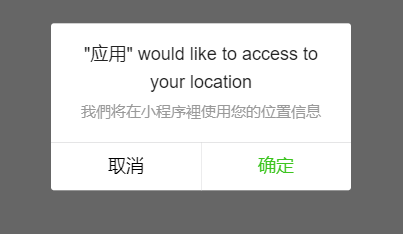
這個確認後,就可以使用小程序提供的 wx.getLocation({ }) , 便可以得到經緯度
wx.getLocation({
      type: 'gcj02',
      success(res) {
        const latitude = res.latitude
        const longitude = res.longitude
        const speed = res.speed
        const accuracy = res.accuracy
        console.log("location: " + JSON.stringify(res));
      }
})
如果想要獲得經緯度所在的省份、城市,必須要藉由微信地圖的 sdk : https://lbs.qq.com/qqmap_wx_jssdk/index.html
申請後,會得到一串 API key,
在小程序內可以使用:
var QQMapWX = require('../lib/qqmap-wx-jssdk.js');
var qqmapsdk;
var MAP_API_KEY = "XXXXXXXX";

const LocationUtil = {

  init: function() {
    qqmapsdk = new QQMapWX({
      key: MAP_API_KEY,
      success: function () {
        console.log('init QQ map successfully!')
      },
      fail: function(res) {
        console.log('init QQ map failed!' + JSON.stringify(res));
      }
    });
  },

  getLocationDetail: function(callback) {
    qqmapsdk.reverseGeocoder({
      location: {
        latitude: latitude,
        longitude: longitude
      },
      success: function (res) {
        console.log("get Geocoder success: " + JSON.stringify(res));
        let province = res.result.ad_info.province;
        let city = res.result.ad_info.city;
        let district = res.result.ad_info.district;
        if (callback != null) {
          callback({ province: province, city: city, district: district })
        }
      },
      fail: function (res) {
        console.log('init QQ map failed!' + JSON.stringify(res));
      }
    })
  }
}